Creators
What Equipment You Need to Start Creating Content
Start with your phone, a window and free editing apps. Upgrade in this order: a microphone, a tripod, then a light. Add a laptop and backup power when you grow.
MachineWura Team
March 11, 2025 · 12 min read
To start creating content you need only a recent smartphone, good daylight from a window and a free editing app; buy nothing else until you have posted consistently for a few weeks. When you do upgrade, buy in this order: a microphone first, a tripod second and a light third, because viewers forgive average video far more readily than bad sound or shaky footage.
Updated October 2026.
What is the minimum equipment to start?
A phone that records clear 1080p video, a quiet room and a free editing app are enough to start. Most phones from the last few years shoot video good enough for TikTok, Instagram Reels, YouTube Shorts and WhatsApp Status, so the camera is rarely what holds a beginner back.
Before you buy anything, make your first ten videos with what you have. You will learn what you really struggle with (sound, light, angles or editing), and that tells you what to buy first.
Which upgrades improve content most?
Audio improves content most for the least spend, then stability, then lighting. This table ranks the common upgrades by the problem they fix.
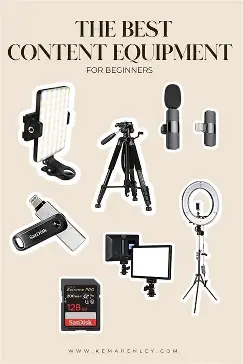
| Upgrade | Problem it fixes | Priority | Notes |
|---|---|---|---|
| Lavalier (clip-on) microphone | Echo, distant voice, background noise | 1 | Biggest single improvement for talking videos |
| Tripod with phone clamp | Shaky footage, awkward angles, needing a helper | 2 | Lets you film alone, at eye level |
| LED light or ring light | Dark, grainy or yellow video indoors and at night | 3 | Lets you film after sunset and during cloudy days |
| Wireless microphone kit | Cable limits movement | 4 | For vlogs, interviews and moving shots |
| Power bank or power station | Phone, light and laptop dying during dumsor | 4 | Matters more in Ghana than in most countries |
| Laptop for editing | Slow editing, long YouTube videos | 5 | Phone editing is fine for short videos |
| External SSD | Phone storage full | 5 | Needed once you shoot 4K regularly |
| Gimbal | Wobbly walking shots | 6 | Phones already stabilise well; a gimbal is for smooth moving shots |
| Dedicated camera | Low light, interchangeable lenses | 7 | Rarely needed at the start |
Stage 1: what can you do with just a phone?
You can make good content with only a phone if you control light, sound and framing for free.
- Light: sit facing a window during the day, so the light falls on your face. Never sit with the window behind you; the camera exposes for the bright window and your face goes dark.
- Sound: film in a room with curtains, a bed or sofa and soft things, which absorb echo. Bare walls and tiles bounce sound. Record when the neighbourhood is quiet: early morning, before the generators, traffic and church speakers start.
- Stability: prop the phone on books or a shelf at eye level. A phone held at arm's length shakes and films up your nose.
- Camera: use the back camera if you can; it is better than the selfie camera on most phones. Clean the lens with a soft cloth before every shoot, especially in harmattan.
- Settings: 1080p at 30 frames per second is enough for social media. 4K uses far more storage and is only worth it if you plan to crop or post on YouTube.
- Editing: free apps such as CapCut and VN on phones, iMovie on iPhone, and DaVinci Resolve on computers cover cutting, captions, music and colour.
Stage 2: what are the first upgrades to buy?
Buy a clip-on microphone, a tripod and one light, in that order. Together they move content from casual to clearly produced.
Microphone: the first upgrade
A lavalier microphone clips to your shirt about a hand's width below your chin, so it picks up your voice from close range and much less of the room. The difference in clarity is immediate.
- Wired lavalier: plugs into the phone's USB-C or Lightning port, or the 3.5 mm headphone jack if it has one. The cheapest option; the cable limits movement.
- Wireless lavalier kit: a small transmitter clips on you, and a receiver plugs into the phone. Lets you move freely and record two people for interviews. DJI and Rode both make well-known kits, and many cheaper brands exist.
- Check the connector before you buy. A USB-C microphone needs a USB-C phone; older iPhones need Lightning or an adapter.
- Look for a windscreen (a small foam or fur cover) for outdoor recording; wind noise ruins outdoor audio.
For podcasts and voiceovers, a USB desk microphone is better. A dynamic microphone (one that mainly picks up sound close to it) suits noisy neighbourhoods better than a condenser microphone, which captures more detail but also the fan, the generator next door and the traffic.
Tripod: the second upgrade
A tripod with a phone clamp lets you film alone, at eye level, with steady framing. Choose one that extends to at least 1.5 metres so you can film standing, and with a clamp that holds the phone both upright (for TikTok, Reels and Shorts) and sideways (for YouTube). A small flexible tripod is useful for desk shots and cooking content from above.
Light: the third upgrade
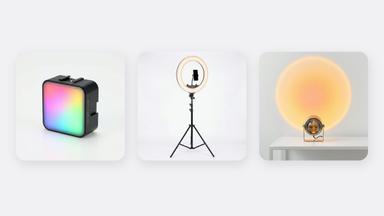
A light lets you film at any time, including at night and on dull rainy-season days. Two common types:
- Ring light: a circle of LEDs with the phone in the middle. Even, flattering light for face-to-camera videos, but it creates a ring reflection in glasses and eyes and can look flat.
- LED panel: a flat rectangle of LEDs, placed at about 45 degrees to one side of your face. Gives more natural shape to faces and works for product shots.
What to look for in either:
- Adjustable brightness and colour temperature, roughly 3,200 K (warm, like a bulb) to 5,600 K (cool, like daylight). Match the light to the room so skin does not look orange or blue.
- CRI of 95 or above. CRI (colour rendering index) measures how accurately a light shows colours. Low-CRI lights make skin look grey or green.
- USB-C power or a battery. Small lights that run from a power bank keep working during outages.
The budget home studio guide shows how to arrange light, sound and background in a small room.
Stage 3: what does a full creator kit look like?
A full kit adds a laptop for editing, storage, backup power and, for some creators, a gimbal or dedicated camera. Buy these when your content needs them, not before.
Do you need a laptop for editing?
Not for short videos; phone apps edit Reels and TikToks well. A laptop helps once you edit longer YouTube videos, work with several clips and music tracks, or manage files for clients.
For editing 1080p and occasional 4K, aim for:
- RAM: 16 GB. 8 GB works for 1080p but slows down with 4K and effects.
- Storage: a 512 GB SSD, plus external storage for footage.
- Processor: a recent Apple M-series chip, Intel Core i5 or Ryzen 5 class, or better.
- Screen: a good IPS or better screen, so colours look right when you edit.
Apple's MacBook Air models with M-series chips are a common choice for creators because they edit video efficiently and run for many hours on battery, which helps during outages. The MacBook Air M3 has no fan, so it is silent and does not pull dust inside. For a Windows option on a tighter budget, the student laptop guide explains which specs to prioritise.
How much storage do you need?
Video fills storage faster than most creators expect. Apple lists these approximate sizes for one minute of iPhone video in the efficient HEVC format:
- 1080p at 30 fps: about 60 MB
- 4K at 30 fps: about 170 MB
- 4K at 60 fps: about 400 MB
Worked example: you post three videos a week and record 20 minutes of raw footage for each in 4K at 30 fps:
- 3 × 20 minutes = 60 minutes a week
- 60 × 170 MB = about 10 GB a week
- About 40 to 45 GB a month, or roughly 500 GB a year
That fills a 128 GB phone in about three months. Move finished projects to an external SSD and keep a second copy somewhere else; a single drive can fail or be stolen. Filming in 1080p instead cuts the same footage to about 3.6 GB a week.
Do you need backup power?
Yes, if you film or edit at home in Ghana. An outage halfway through a shoot or an export can cost you a day, and a sudden cut can corrupt files on a desktop computer.
Worked example: sizing a power station for a filming day
- Laptop editing: 45 W × 4 hours = 180 Wh
- LED panel: 30 W × 3 hours = 90 Wh
- Wi-Fi router: 10 W × 8 hours = 80 Wh
- Phone and microphone charging: about 30 Wh
- Total: about 380 Wh
Allow for conversion losses by dividing by about 0.85: you need about 450 Wh of usable capacity, so a power station of around 500 Wh covers that day. Check the wattage labels on your own equipment and redo the sum. The portable power station guide explains capacity, output and battery types. For phones alone, a 20,000 mAh power bank is often enough.
Do you need a gimbal or a camera?
Usually not at first. A gimbal (a motorised handle that keeps the phone level as you move) gives smooth walking, panning and following shots, but modern phones already have strong built-in stabilisation; try your phone's stabilisation mode first. A dedicated camera helps for low light, background blur and interchangeable lenses, but it adds cost, weight and a slower workflow. Upgrade your phone before you buy a camera if your phone is old.
How do you upload large videos on Ghanaian internet?
Plan uploads around your upload speed, which is usually lower than your download speed. Run a speed test to find it.
Worked example: a 1 GB video on a connection with 5 Mbps upload speed:
- 1 GB is about 8,000 megabits
- 8,000 ÷ 5 = 1,600 seconds, about 27 minutes
Export at the resolution the platform uses (1080p for most social media), upload at quieter times of day, and use Wi-Fi rather than mobile data for long videos where you can. A MiFi 4G router gives you a hotspot for laptops when there is no fixed connection.
How do you protect your gear in Ghana's conditions?
- Heat: do not leave phones, lights or batteries in a parked car or in direct sun. Heat ages batteries and makes phones dim the screen or stop recording.
- Harmattan dust: clean lenses before every shoot, store gear in a closed bag, and wipe microphone windscreens.
- Coastal humidity: keep silica gel sachets in your camera and microphone bag if you live near the sea.
- Surges: charge equipment through a surge protector, never straight from a generator with an unsteady output.
Common mistakes
- Buying a ring light first. Sound and stability fix more problems for less.
- Waiting for the perfect setup. Ten published videos teach more than any purchase.
- Filming with a window behind you. Your face goes dark; turn around.
- Shooting everything in 4K at 60 fps. It fills storage and slows editing with little benefit on social media.
- Buying a microphone with the wrong connector. Check USB-C, Lightning or 3.5 mm first.
- Keeping footage only on the phone. One drop or theft and it is gone.
- Buying a camera before learning light and sound. A camera does not fix a dark, echoing room.
- No backup power. Outages ruin shoots and exports.
Your step-by-step plan
- Make ten videos with only your phone, window light and a free editing app.
- Note what bothers you most: sound, shake or darkness.
- Buy a clip-on microphone that fits your phone's port.
- Add a tripod with a phone clamp.
- Add one LED light with adjustable colour temperature and CRI 95+.
- Add a power bank, then a power station if you edit at home.
- Add a laptop when long-form editing on the phone becomes slow.
- Add an external SSD and keep two copies of finished work.
- Consider a gimbal or camera only when your content clearly needs one.
Frequently asked questions
Can I start content creation with just my phone?
Yes. Any recent smartphone records video good enough for social media. Use window light, a quiet room and a free editing app, and post consistently.
What should I buy first, a microphone or a ring light?
A microphone. Viewers leave videos with poor sound sooner than videos with average light, and a clip-on microphone fixes echo and background noise immediately.
Which phone is best for content creation?
A phone with good stabilisation, a strong main camera and enough storage, 256 GB if you film a lot. Recent iPhones and upper mid-range or flagship Androids all work well; check video samples before buying.
Do I need a laptop to edit videos?
Not for short videos; apps like CapCut and VN edit them well on a phone. A laptop with 16 GB of RAM helps for long YouTube videos and client work.
How do I keep creating during dumsor?
Use battery-powered lights, charge everything when power is on, and keep a power bank for phones. For laptop editing, a power station of about 500 Wh covers a typical day; work out your own needs with watts × hours.
Is a gimbal necessary for beginners?
No. Modern phones stabilise well on their own, and a tripod solves most shake. Buy a gimbal when you film many walking or moving shots.
How can I earn from content creation?
Build a consistent audience first, then look at brand deals, platform payouts and affiliate programmes. MachineWura also runs a creator programme that you can apply to.
Need a microphone, light, laptop or backup power for your setup? Browse MachineWura accessories or WhatsApp 0550 314 351 and tell us what you create.
Buying from MachineWura
An online electronics store in Accra selling brand new and UK-used phones, laptops, creator gear and appliances.
Pay on Delivery in Accra
Inspect it at your door, then pay.
Checked before it ships
UK-used devices pass a 30-point check with at least 85% battery.
Fast delivery
24 hours in Accra, 2 to 3 days elsewhere in Ghana.
7-day returns
If it arrives defective or not as described.
Published March 11, 2025 · 12 min read