Creators
How to Set Up a Home Studio in Ghana on a Budget
Start a home studio with the room: a soft, quiet space away from roof rain and generators, soft lighting, a close mic and backup power for dumsor.
MachineWura Team
March 11, 2025 · 14 min read
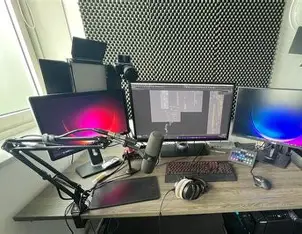
A good home studio in Ghana starts with the room, not the gear: pick a small room full of soft furnishings, away from the street, the generator and a bare metal roof, then fix echo with what you already own, light your face with one large soft light, put the microphone close to your mouth, and keep the setup on backup power so dumsor does not end a recording. Get those five things right and a phone and a modest microphone will sound and look far better than expensive equipment in a bare, echoing room.
Updated October 2026.
What makes a home studio work?
Three things decide quality: how quiet and dead (echo-free) the room is, how even the light is on your face, and how stable your power is. Equipment comes after.
| Factor | Why it matters | Budget fix |
|---|---|---|
| Echo | Bare walls and tiled floors make voices sound hollow and distant | Rugs, curtains, duvets, a full wardrobe or bookshelf |
| Outside noise | Traffic, generators, roosters, neighbours and rain on the roof all reach the mic | Choose the right room and time; seal gaps |
| Room noise | Fans, AC units and fridges hum and whoosh | Switch off while recording; cool the room first |
| Light | Uneven light looks amateur even on a good camera | One large soft light at 45 degrees |
| Power | Outages end takes and can corrupt files | UPS or power station; surge protection |
If you have not chosen your camera, mic and lights yet, our guide on what equipment you need to start content creation covers the gear itself. This guide is about the space.
Which room should you use?
The best room is usually a bedroom: small to medium, with a bed, curtains, wardrobe and clothes that soak up sound. Large, empty sitting rooms with tiled floors and high ceilings are the hardest to make sound good.
Check each candidate room against these points:
- Distance from the street. Pick the side of the house away from the road, hawkers and okadas.
- Distance from generators. Yours and your neighbours'. During dumsor, a street can go from quiet to loud in minutes.
- The roof above it. Rain on aluminium or iron roofing sheets is very loud. A room with a concrete slab or a ceiling with insulation above it is quieter in the rainy season.
- Windows. Louvre (naco) windows leak sound through every gap. A room with sliding glass windows, or with few windows, is easier to quieten.
- Shape. A rectangular room is better than a perfect square, which builds up strong echoes at certain frequencies.
- Power points. You want at least one earthed socket near your desk so you are not running long extension leads.
The clap test
Stand in the middle of the room and clap once, loudly. Listen. If you hear a ringing "zing" or a tail of echo, the room needs treatment. If the clap sounds short and dull, it is already a good space for voice. Repeat the test after each change you make.
Worked example: a noise audit
Before you commit, score each room from 0 (bad) to 2 (good) for each source of noise, at the times you plan to record.
| Noise source | Room A: front bedroom | Room B: back bedroom |
|---|---|---|
| Road and street | 0 | 2 |
| Generators nearby | 1 | 1 |
| Roof noise in rain | 0 (metal sheets, no ceiling) | 2 (ceiling with insulation) |
| Windows | 0 (louvres) | 1 (sliding glass) |
| Soft furnishings | 2 | 2 |
| Echo (clap test) | 1 | 2 |
| Total (out of 12) | 4 | 10 |
Room B is the clear choice, even if Room A has the nicer view. Record your audit at the time of day you will film; an empty road at 6 am can be a busy one at 6 pm.
How do you fix echo without spending much?
Echo is sound bouncing off hard surfaces back into the microphone. You fix it by covering hard surfaces near you and the mic with soft, thick material. This is called acoustic treatment, and it is different from soundproofing (stopping sound getting in or out), which needs heavy building work.
Use what you have first:
- A thick rug on a tiled floor.
- Heavy curtains, closed, over windows and on the wall behind the camera.
- A duvet or blanket hung on the wall you face, or over a clothes rail beside you.
- A wardrobe or bookshelf full of uneven objects, which breaks up reflections.
- Cushions on any hard chair or sofa in shot.
Find the reflection points. Sit in your recording spot and have someone slide a mirror along the side walls. Wherever you can see the microphone in the mirror, sound is bouncing straight back at it. Put something soft there.
About acoustic foam: thin foam squares absorb some high frequencies but do little for the lower tones of the voice, and they collect harmattan dust. Panels made from mineral wool or rockwool inside a simple wooden frame covered in breathable fabric absorb far more, and are harder to set alight than foam. Whatever you use, keep it away from lights and sockets.
How do you keep outside noise out?
You cannot soundproof a room cheaply, but you can block the worst gaps and choose your timing.
- Seal the door. A draught excluder or a rolled towel along the bottom gap makes a noticeable difference. A solid door is quieter than a hollow one.
- Cover louvre windows with heavy curtains, or block them with a thick panel while recording.
- Record at quiet times. Early morning before the neighbourhood wakes, or late evening, are usually quietest. Avoid the times when nearby churches, mosques or events use loudspeakers.
- Have a rain plan. Heavy rain on a metal roof will stop most recordings. Use those hours for editing instead.
- Record 30 seconds of silence (room tone) at the start of every session. Editing software can use it to reduce constant background hiss.
How do you deal with heat?
A closed, curtained room in Ghana gets hot quickly, and fans and air conditioners are some of the loudest noise sources in a studio. Plan around it rather than fighting it.
- Cool the room before you start. Run the AC or fan for 20 to 30 minutes, then switch it off for the take.
- Record in short blocks of 15 to 20 minutes, with a cooling break in between.
- Use LED lights only. Older halogen lamps add a lot of heat.
- If a fan must run, use a quiet one on low speed, behind the microphone and pointing away from it. Most microphones pick up sound mainly from the front.
- Wear light clothing and keep a towel nearby; sweat shows under bright light.
How should you light the space?
Light your face with one large, soft light source placed in front of you and about 45 degrees to one side, slightly above eye level. That one change does more for video than any camera upgrade.
- Key light: the main light, at 45 degrees. A softbox, an LED panel with a diffuser, or a window with no direct sun.
- Fill light: a weaker light, or a white wall or board, on the other side to soften shadows.
- Back light (optional): a small light behind you, pointing at your hair and shoulders, to separate you from the background.
Getting the colour right
Light has a colour temperature, measured in kelvin (K). Daylight is around 5,600 K (bluish white); indoor warm bulbs are around 3,000 K (orange). Do not mix them on your face, or your skin will look two different colours. If you use window light, set your LED lights to daylight; if you record at night, close the curtains and use only your LEDs.
Look for lights with a CRI (colour rendering index) of 95 or higher. CRI measures how true skin tones look; cheap lights with low CRI make skin look grey or green.
Window light near the equator
Ghana has roughly 12 hours of daylight all year, with sunrise and sunset around 6 o'clock. That makes window light predictable, but the midday sun is very high and harsh. Record by a window that is out of direct sunshine at your recording time, and diffuse it with a thin white curtain. Light changes fast in the hour after sunrise and before sunset, so avoid long takes then.
Ring lights
A ring light is quick and even, but it puts a ring reflection in your eyes and in glasses, and it flattens your face. It suits short phone videos. For a seated podcast or tutorial, a softbox or panel at 45 degrees looks more natural.
How should you lay out the space?
The right layout depends on what you make. Use this as a starting point.
| Format | You | Camera | Microphone | Background |
|---|---|---|---|---|
| Talking-head video | Seated, 1 to 2 m from the wall behind you | At eye level, 1 to 2 m in front | Lavalier on your shirt, or a shotgun mic just out of frame | 1 to 2 m behind you, tidy, with one lamp or plant |
| Podcast (audio or video) | Seated at a desk, facing into the room, not a wall | Optional, at eye level | Dynamic mic on an arm, 10 to 15 cm from mouth | Soft wall or shelf |
| Two-person podcast | Facing each other at 45 degrees | One wide, or one per person | One dynamic mic each, pointing away from the other person | Same |
| Voiceover or vocals | Facing soft material, such as a wardrobe of clothes | None | Mic in front of soft material | Not in shot |
Sitting with space behind you does two things: it stops your shadow landing on the wall, and it lets the background fall slightly out of focus, which looks more professional.
Which microphone suits an untreated room?
A dynamic microphone picks up mostly what is close to it and ignores much of the room, which makes it the safest choice for a bedroom studio. A condenser microphone is more sensitive and detailed, but it also captures echo, fans and traffic. Use a condenser only once your room is quiet and treated.
Whatever you use, set your recording level so your loudest speech peaks at around -12 dB on the meter, and record at 48 kHz, 24-bit, which is the standard for video.
Monitor with closed-back headphones so the sound does not leak into the microphone. Our over-ear headphones guide explains open-back and closed-back designs. For editing, an external computer monitor with an IPS panel and good sRGB colour coverage helps you judge skin tones and colour.
How do you keep recording through dumsor?
Plan for outages, because losing power mid-take wastes the take, and losing it mid-save can corrupt the file.
Worked example: power for a session
Add up your studio's watts:
- Laptop: 65 W
- Two LED panels: 2 x 45 W = 90 W
- External monitor: 25 W
- Audio interface: 5 W
- Wi-Fi router: 15 W
- Total: about 200 W
A 3-hour session uses 200 x 3 / 1000 = 0.6 kWh.
- A UPS of 1,000 VA gives you minutes at this load, not hours: enough to stop recording, save and shut down cleanly. See our UPS guide for runtime and VA.
- A portable power station with about 1 kWh usable gives roughly 4 hours at 200 W, after inverter losses (1,000 x 0.85 / 200). That covers a full session.
- Battery-powered lights and camera reduce the load. Many LED panels run on camera batteries; charge them while the grid is on.
Also plug everything into a surge-protected strip. A spike when power returns can damage a laptop charger, interface or monitor. If you hear a low hum in recordings, check that the setup is on one earthed socket rather than spread across rooms.
Protecting equipment from dust and humidity
Harmattan dust and coastal humidity are both hard on cameras and microphones.
- Cover gear with a cloth or keep it in a bag when not in use, especially from roughly December to February.
- Clean lenses with a blower and microfibre cloth, never your shirt.
- Store lenses and microphones with silica gel sachets in a sealed box. In humid areas, mould can grow inside lenses left in a damp cupboard.
- Do not move cold gear into a warm, humid room and use it straight away; let condensation clear first.
Your step-by-step setup checklist
- Choose the room using the noise audit and clap test.
- Add soft furnishings and cover the reflection points.
- Seal the door gap and cover louvre windows.
- Set up your desk or seat 1 to 2 m from the back wall.
- Place the key light at 45 degrees, then the fill.
- Set the camera at eye level, 1 to 2 m away.
- Position the microphone close and set levels to peak around -12 dB.
- Plug everything into a surge strip, with a UPS or power station for the laptop.
- Switch off fans, AC and fridge nearby; record room tone.
- Do a 1-minute test recording and listen back on headphones before the real take.
Common mistakes
- Buying a condenser mic for an echoey room. It records the room, not just you.
- Sitting against the wall. Your shadow falls behind you and the shot looks flat.
- Mixing daylight and warm bulbs on your face.
- Covering walls in thin foam and expecting soundproofing.
- Leaving the fan or AC on during takes.
- Placing the mic too far away, such as on the desk a metre from your mouth.
- Recording without backup power and losing a long take to dumsor.
- Forgetting room tone, which makes noise reduction harder later.
Frequently asked questions
What is the cheapest way to reduce echo in a room?
Use what you already have: a thick rug, heavy curtains, a duvet on the wall you face and a full wardrobe or bookshelf. Then use the clap test to check the difference.
Does acoustic foam soundproof a room?
No. Foam reduces some echo inside the room but does little to stop outside noise. Keeping noise out needs heavy, sealed doors and windows.
How do I stop generator noise in my recordings?
Choose a room on the far side of the house from generators, use a dynamic microphone close to your mouth and record when outages are less likely. Noise reduction in editing can help with steady hum, but not with loud engines.
Can I record with the fan on?
It is better not to, because fans add steady noise. Cool the room first, then switch the fan off for each take, or use a quiet fan on low speed behind the microphone.
What backup power do I need for a home studio?
A UPS gives you time to save and shut down when power goes. For whole sessions through outages, a power station with about 1 kWh usable runs a typical 200 W setup for around 4 hours.
Is a ring light good for a home studio?
It is quick and fine for short phone videos, but it leaves a ring reflection in your eyes and glasses. A softbox or LED panel at 45 degrees gives a more natural look for longer videos.
What microphone is best for a bedroom studio?
A dynamic microphone close to your mouth, or a lavalier clipped to your shirt. Both pick up your voice and ignore much of the room.
Building your setup? See the MachineWura creators page or message us on WhatsApp on 0550 314 351.
Buying from MachineWura
An online electronics store in Accra selling brand new and UK-used phones, laptops, creator gear and appliances.
Pay on Delivery in Accra
Inspect it at your door, then pay.
Checked before it ships
UK-used devices pass a 30-point check with at least 85% battery.
Fast delivery
24 hours in Accra, 2 to 3 days elsewhere in Ghana.
7-day returns
If it arrives defective or not as described.
Published March 11, 2025 · 14 min read