Every Week, Ghanaians Lose Money Buying Fake iPhones
In cities like Accra and beyond, hundreds of cedis are lost weekly to iPhone scams. The phone looks original. The box looks untouched. Even the settings seem convincing until you start using it.
By then, it’s too late.
Whether you’re buying from a street vendor, a friend’s recommendation, or an online seller, knowing how to verify an iPhone before you pay is no longer optional it’s survival.
This guide breaks everything down for you, from quick checks to deeper verification methods, so you never get caught on the wrong side of a “good deal.”
What Makes an iPhone “Original”?
A real iPhone is designed, manufactured, and sold by Apple Inc.. It runs genuine iOS, uses Apple-certified hardware, and has a valid IMEI registered in Apple’s global system.
Anything outside of that falls into risky territory.
Fake or clone iPhones are built by third-party manufacturers, mostly to imitate the look of an iPhone. Some are so convincing that even experienced buyers get fooled at first glance.
Then there are “frankenphones” devices made from a mix of original and non-original parts. These are even trickier because they can pass some checks and fail others.
The key is not to rely on one test alone.
How to Check the IMEI Number
The IMEI is your first line of defense. It’s a unique 15-digit number assigned to every legitimate phone.
Dial *#06# and the IMEI should appear instantly. You can also find it in Settings under General and About, on the SIM tray for many models, and on the phone’s box.
Here’s where most people get it wrong they check only one place.
All IMEI numbers across the phone, SIM tray, and box must match exactly. If even one is different, something is off. It could mean the phone has been swapped, repaired with mismatched parts, or is completely fake.
Sometimes, fake iPhones don’t even respond properly to the *#06# code, or they display a suspicious-looking number. That alone should stop the transaction immediately.
How to Verify via Apple’s Official Website
Once you have the IMEI or serial number, the next step is to confirm it directly with Apple.
Go to Apple’s official coverage checker and enter the details. If the phone is real, you’ll see its model, warranty status, and eligibility for support.
If Apple cannot recognize the number, that’s a major red flag.
A genuine iPhone always exists in Apple’s database. If it doesn’t show up, you’re likely dealing with a clone or a tampered device.
This single step has saved many buyers from losing thousands of cedis yet many people skip it out of excitement or pressure from the seller.
Physical Signs of a Fake iPhone
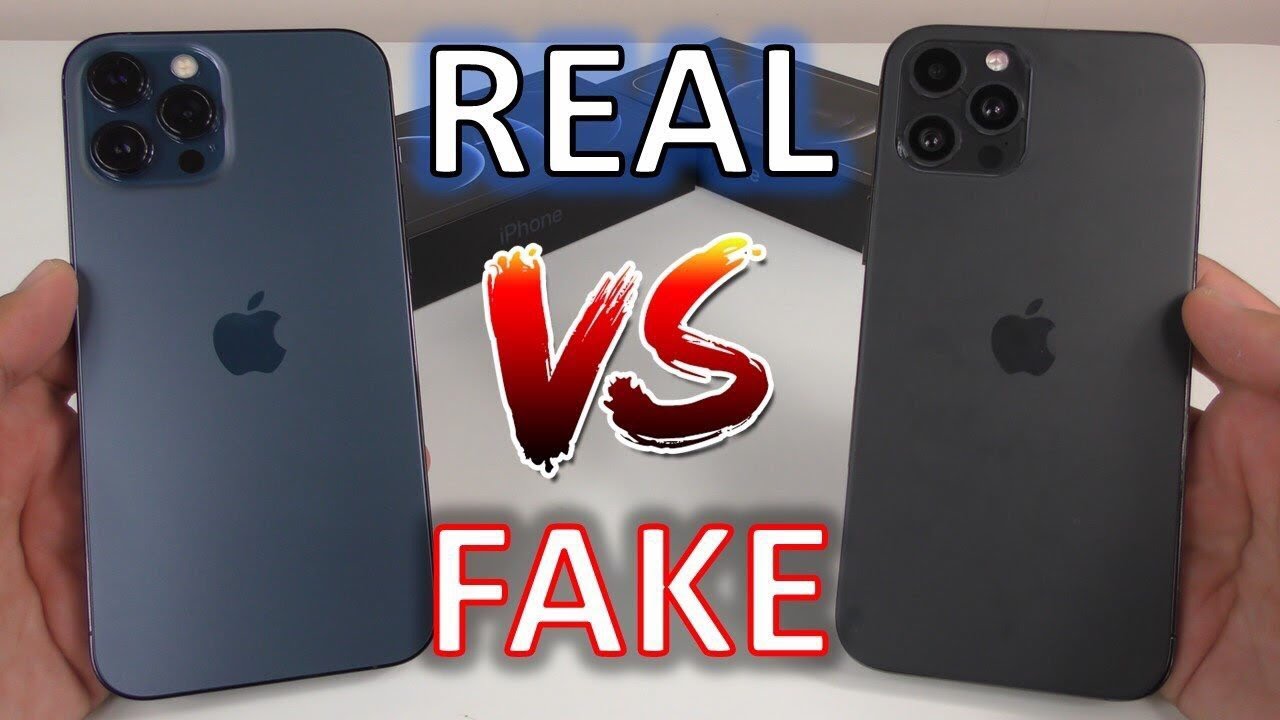
At first glance, clones can look identical. But when you slow down and pay attention to detail, the differences start to show.
A real iPhone feels solid. The buttons click firmly, not loosely. There’s no rattling when you gently shake the device. The edges are smooth and precise, with almost no visible seam between the screen and the body.
On fake devices, you’ll often notice slight gaps, uneven finishes, or buttons that feel cheap.
The Apple logo is another giveaway. On genuine iPhones, it sits perfectly flush with the surface. On clones, it may feel raised, slightly misaligned, or just “off” when you run your finger across it.
Then there’s the display. Real iPhones have sharp, vibrant screens with smooth scrolling. Fake ones may look dull, overly bright, or show strange color shifts when tilted.
Even small details like text and icons matter. Apple is known for precision so anything that looks blurry, misaligned, or inconsistent should make you pause.
Software Signs You’re Holding a Clone
This is where most fake iPhones fail completely.
Start with the Settings app. On a real iPhone, everything is clean, responsive, and consistent. The “About” section shows accurate model information and system details.
Clones often struggle here. You may notice missing information, strange model names, or menus that lag or don’t open properly.
Try activating Siri. A genuine iPhone responds instantly with Apple’s voice assistant. Many fake phones either don’t have Siri or use a poor imitation that quickly exposes itself.
Biometric features like Face ID and Touch ID are also hard to fake. If they feel inconsistent, slow, or unreliable, that’s a warning sign.
Open the App Store next. A real iPhone connects directly to Apple’s ecosystem. Fake ones might redirect you, show a different interface, or require unusual login steps.
The camera is another easy test. Real iPhones handle features like Portrait Mode and Night Mode smoothly. Fake ones struggle, producing grainy or delayed images.
And finally, check for AirDrop. It’s an Apple-exclusive feature. If it’s missing or doesn’t work properly with another Apple device nearby, that’s a strong indicator you’re not holding the real thing.
What to Do If Your iPhone Fails the Test
If you haven’t paid yet, the decision is simple walk away.
No discount, no explanation, and no “last price” should convince you to ignore failed checks. A genuine seller will never rush you or resist verification.
If you’ve already paid, act quickly. Take photos of the device, the box, and the IMEI. Save all chats and receipts. Then report the case to the Ghana Police Service, especially their cybercrime unit.
If you’re still unsure, take the phone to a trusted shop for a second opinion. Many reputable sellers will help you verify at no cost.
Where to Buy Verified Original iPhones in Ghana
The safest approach is simple buy from sellers who verify their devices before you even see them.
Trusted vendors test IMEI numbers, confirm battery health, and inspect every component before listing a phone for sale. Some even allow payment on delivery in cities like Accra and Kumasi, giving you the chance to run your own checks before paying.
That alone reduces your risk significantly.
Where to Buy Verified Original iPhones in Ghana
The easiest way to avoid all of this stress is to buy from a seller who does the verification before the phone even reaches your hands.
At MachineWura, every iPhone goes through a 30-point quality inspection IMEI verified, battery health checked, and confirmed original before it's listed for sale. You can also pay on delivery in Accra and Kumasi, which means you can run your own checks when the phone arrives before you hand over a single cedi.
Final Thought
In today’s market, knowing how to verify an iPhone is just as important as having the money to buy one.
Because the difference between a good deal and a costly mistake is often just a few simple checks.
Take your time. Test everything. And never let pressure make the decision for you.
👉 Browse verified iPhones at MachineWura
Related reads: How to Check If an iPhone Is Stolen Before You Buy It · UK Used vs Refurbished vs Brand New iPhone · 10 Things to Check Before Buying a UK-Used Phone in Ghana
Looking for the best deals?
Browse our full collection of verified tech — all with pay-on-delivery and a 30-day warranty.
Thanks for reading!
Published March 11, 2025 · 6 min read