Battery Health Guide for Buying Used iPhones in Ghana
Battery health is one of the most overlooked parts of buying a second-hand iPhone in Ghana and easily one of the most important.
Most people focus on how the phone looks on the outside. Clean body, no cracks, maybe even the original box. But the real condition of the phone is inside, and that’s where battery health becomes critical. A phone can look perfect and still perform terribly if the battery is degraded.
A weak battery doesn’t just drain fast. It affects how the entire phone behaves. It can shut down unexpectedly, slow down performance, and leave you constantly searching for a charger. And the worst part? It’s an extra cost most buyers don’t plan for.
If you’re buying a used iPhone, this is something you should check before anything else.
What Battery Health on an iPhone Really Means
Every iPhone uses a lithium-ion battery, and like all batteries of this type, it naturally wears out over time. The more you use and charge it, the more its capacity reduces.
Apple Inc. built a system into iPhones that lets you see exactly how much of the original battery capacity is still available. This is what is called battery health.
When a phone is brand new, it shows 100 percent. As months and years pass, that number drops gradually. Around 500 full charge cycles, Apple expects the battery to still retain about 80 percent of its original capacity.
That percentage might sound like just a number, but in real life it directly affects how long your phone lasts in a day, how stable it is, and how smooth it feels when you’re using it.
How to Properly Check Battery Health
Checking battery health is simple, but the important part is how you check it.
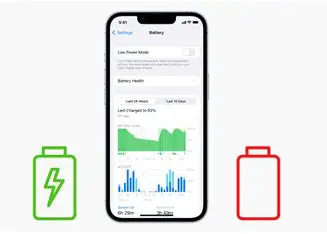
You need to open the Settings app, go into the Battery section, and then tap on Battery Health and Charging. The number you see there is the true condition of the battery.
The key thing here is that you must do this yourself. Don’t let the seller show you a screenshot. Don’t let them “explain it.” Hold the phone, go into the settings, and check it directly.
If the phone is relatively recent and that option is missing, that alone is a red flag. Either the software has been tampered with, or something is being hidden.
What Battery Percentage Is Actually Good
Not every drop in battery health is a problem. The goal is to understand what is acceptable and what isn’t.
A battery health in the 90s feels almost like a new phone. The performance is stable, and you can comfortably get through a full day depending on your usage.
Once it drops into the mid to high 80s, the difference starts to become noticeable, but it is still perfectly usable for most people. This is where many good second-hand iPhones sit.
As it moves closer to 80 percent, you begin to feel the limitations more clearly. The phone drains faster, and you may need to charge it before the day ends.
Anything below 80 percent is where problems become obvious. At that point, the battery is considered degraded, and the phone may start behaving unpredictably.
For most buyers, anything from 85 percent and above is a safe and reasonable range.
How Poor Battery Health Affects Daily Use
A degraded battery doesn’t just mean shorter battery life. It changes how the entire phone performs.
One of the most frustrating issues is unexpected shutdowns. You could be using your phone at 30 or 40 percent, and it suddenly powers off. This happens because the battery can no longer supply the power the processor needs at that moment.
There’s also something called performance management, where the phone intentionally slows itself down to prevent crashes. So if a phone feels unusually slow, the battery might actually be the reason.
Over time, you’ll also notice that the phone doesn’t last as long as it used to. What should have been a full day of use turns into a few hours, forcing you to charge multiple times a day.
Charging itself can become inconsistent too, especially with heavily degraded batteries.
How Sellers Try to Hide Battery Problems
Once you understand battery health, you’ll realise why some sellers try to avoid it.
A common trick is showing a screenshot of a high battery percentage instead of letting you check the phone directly. Another is keeping the phone fully charged so you don’t notice how quickly it drains.
Some sellers rush the process so you don’t have time to properly test anything. Others avoid updating the phone’s software because certain battery information may not show clearly.
This is why it’s important to take your time. Use the phone for a few minutes. Scroll, open apps, maybe even watch a short video. A weak battery usually reveals itself quickly under use.
Battery Replacement Cost in Ghana
If you do find a phone you like but the battery health is low, the next question becomes cost.
In Ghana, replacing an iPhone battery typically costs anywhere between moderate and fairly expensive depending on the model and the quality of the replacement.
Higher-end models tend to cost more, and genuine replacements are more expensive than third-party options.
This is where many buyers make a mistake. They focus on getting a cheaper phone, only to spend more fixing it later. A phone with low battery health should always be priced lower to reflect that upcoming cost.
What You Should Demand When Buying
By the time you’re ready to buy, you should already have a clear standard in mind.
A good used iPhone should have strong battery health that won’t inconvenience you in daily use. If you’re paying close to market price, then the battery condition should match that price.
For newer and more expensive models, expectations should be even higher. If a seller is asking for premium pricing, the phone should deliver premium condition.
Anything below a certain threshold should only be considered if the price makes sense for the compromise you’re accepting.
Buying from a Safer Source
At the end of the day, many of these checks come down to trust.
The safest way to avoid battery issues entirely is to buy from a seller who has already done the checks properly before listing the device.
At MachineWura, every iPhone goes through a full inspection process that includes battery health testing, IMEI verification, and overall performance checks before it is made available for sale.
Instead of guessing, you’re dealing with devices that have already been vetted.
With pay-on-delivery available in Accra and Kumasi, you also get the chance to confirm everything yourself. You can hold the phone, go through the settings, test the battery, and only pay when you’re satisfied.
That extra step removes uncertainty and helps you avoid the hidden costs that often come with buying from the wrong source.
👉 Browse iPhones with verified battery health at MachineWura
Related reads: How to Know If Your iPhone Is Original in Ghana · 10 Things to Check Before Buying a UK-Used Phone in Ghana · UK Used vs Refurbished vs Brand New iPhone
Looking for the best deals?
Browse our full collection of verified tech — all with pay-on-delivery and a 30-day warranty.
Thanks for reading!
Published March 11, 2025 · 6 min read