
Laptops · Apple, 2024
MacBook Air M3 price in Ghana and specs
The MacBook Air M3 is Apple's 2024 thin and light laptop, sold in 13.6-inch and 15.3-inch sizes, with the M3 chip, Wi-Fi 6E and support for two external displays with the lid closed. On a used unit, confirm the memory, then check the cycle count, Activation Lock and company enrolment.
Updated · 8 min read
At MachineWura today
Not in stock · we can source one
Typical market price: GH₵ 9,700 UK used (checked November 2026)
Quick answer
- Who it suits today: students, professionals and creators who want a light, silent Mac with years of life ahead, in a 13-inch or 15-inch size.
- Biggest strength: a modern all-rounder with a fast chip, a bright screen, MagSafe, Wi-Fi 6E and two external displays with the lid closed.
- Biggest weakness: no fan, so long heavy tasks slow down, and early units have only 8 GB of memory.
- The one check on a used unit: confirm the memory size in About This Mac, then make sure there is no Activation Lock or company Remote Management.
- Consider instead: the MacBook Air M2 to save money with the same design, or the MacBook Pro 14 M3 for sustained heavy work.
What is the MacBook Air M3?
The MacBook Air M3 is Apple's thin and light laptop released in March 2024, in two sizes: 13.6 inches and 15.3 inches. It uses the Apple M3 chip, built on a 3-nanometre process, which is faster and more efficient than the M2.
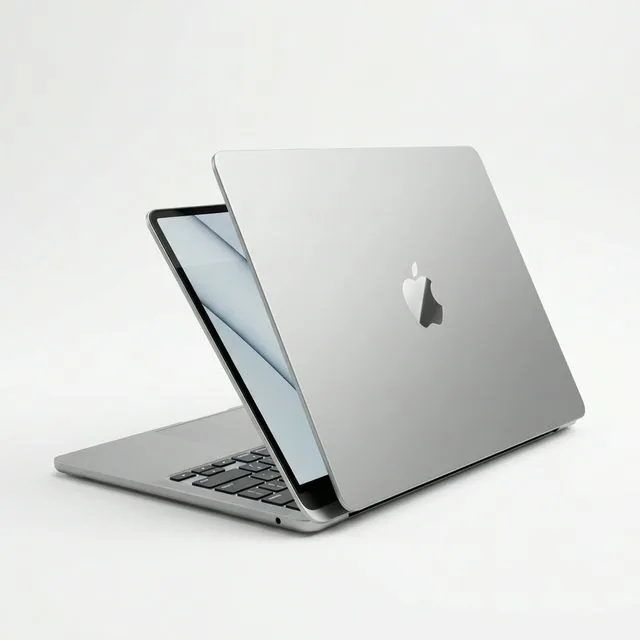
From the outside it is nearly identical to the MacBook Air M2: the same flat aluminium body, notch, MagSafe 3 port and 1080p camera. The changes are inside. The M3 adds faster graphics with hardware ray tracing (a technique for realistic lighting in games and 3D apps), Wi-Fi 6E for faster speeds on compatible routers, and support for two external displays when the lid is closed. Apple also added an anodisation seal to the Midnight colour to reduce fingerprints.
The M3 Air launched with 8 GB of memory as standard. Later in 2024 Apple raised the base memory to 16 GB, so used units in Ghana can have either. In 2025 the M3 Air was replaced by an M4 model.
Is the MacBook Air M3 still worth buying?
Yes. It is one of the safest used Mac buys in 2026 because it is recent, fast and still well inside Apple's update window. Apple has historically supported Macs with macOS updates for several years and security fixes beyond that, and the M3 should outlast the M1 and M2 Air.
The main decision is memory. An 8 GB unit is fine for study, documents, browsing and calls. If you edit photos or video, code with many tools open, or keep dozens of browser tabs, look for 16 GB. Memory is built into the chip and cannot be added later.
If your budget is tight and you do not need two monitors, the M2 Air gives you the same design and screen for less. If you render video every day, the fan-cooled MacBook Pro 14 M3 keeps full speed for longer.
Key specs in plain words
| Spec | What it is | What it means for you |
|---|---|---|
| Chip | Apple M3, 8-core CPU, 8-core or 10-core GPU | Quick for work, study and creative apps |
| Memory | 8 GB, 16 GB or 24 GB unified memory, built in | Cannot be upgraded; check which one you are getting |
| Storage | 256 GB to 2 TB SSD, soldered | Cannot be upgraded; 512 GB is a comfortable minimum for media |
| Screen | 13.6-inch (2560 x 1664) or 15.3-inch (2880 x 1864) Liquid Retina, up to 500 nits | Bright, sharp, colour-accurate; has a camera notch |
| External displays | Two with the lid closed, one with the lid open | Good for a two-monitor desk setup |
| Ports | MagSafe 3, two Thunderbolt / USB 4 ports, 3.5 mm headphone jack | Adapters needed for USB-A and HDMI |
| Wireless | Wi-Fi 6E, Bluetooth 5.3 | Faster Wi-Fi on modern routers |
| Webcam | 1080p FaceTime HD | Clear for calls and online classes |
| Cooling | Fanless | Silent; slows down on long heavy loads |
| Weight | About 1.24 kg (13-inch), about 1.51 kg (15-inch) | Both are light for their size |
Display. Both sizes are bright enough for indoor work and shaded outdoor use. The 15-inch gives noticeably more room for side-by-side windows and spreadsheets, and it has a six-speaker system that sounds fuller than the 13-inch's four speakers.
Performance. The M3 is quick in everything a student or office worker does, and handles Lightroom, Final Cut and coding well. Without a fan, it holds full speed for shorter periods than a MacBook Pro, so a long 4K export takes longer.
Battery and charging. Apple rated both sizes for up to 18 hours of video playback when new. It charges through MagSafe 3 or either USB-C port using USB Power Delivery (USB PD). Units shipped with 30 W, 35 W dual-port or 70 W chargers depending on configuration. Any USB-C PD charger of 30 W or more works; 70 W gives the fastest charging.
Durability. The aluminium body is stiff, but there is no water resistance. The flat edges can dent if dropped on a corner, so a sleeve is worth it.
MacBook Air M3 vs MacBook Air M2
| MacBook Air M2 | MacBook Air M3 | |
|---|---|---|
| Released | 2022 (15-inch in 2023) | 2024 |
| Chip | M2 | M3, faster CPU and GPU, hardware ray tracing |
| Sizes | 13.6-inch and 15.3-inch | 13.6-inch and 15.3-inch |
| External displays | One | Two with the lid closed |
| Wi-Fi | Wi-Fi 6 | Wi-Fi 6E |
| Base memory | 8 GB | 8 GB at launch, 16 GB from late 2024 |
| Design | Same body, notch, MagSafe | Same, with fingerprint-resistant Midnight |
Verdict. If you will connect two monitors at a desk, or want the newest chip for the longest support, choose the M3. If your work is documents, browsing and calls on the laptop screen alone, the M2 does the same job for less. Read the MacBook Air M2 guide for its full details.
Buying a UK-used MacBook Air M3: what to check
Recent ex-corporate MacBooks are common, and many are still enrolled with the company that bought them. These checks protect you. For general laptop checks, see how to check a used laptop before buying.
- Confirm the model, size and memory. Apple menu > About This Mac should show MacBook Air (13-inch, M3, 2024) or (15-inch, M3, 2024), the memory and the serial number. This is the most important step, because 8 GB and 16 GB units look identical.
- Read the cycle count and battery condition. Hold Option, click the Apple menu, open System Information and select Power. Cycle Count should be low for a 2024 laptop, and Condition should say Normal. Apple rates the battery for 1,000 cycles. System Settings > Battery > Battery Health (the information button) shows Maximum Capacity.
- Check Activation Lock. In System Information > Hardware, "Activation Lock Status" must read Disabled. Confirm that Find My Mac is off and no Apple ID is signed in.
- Check MDM and Remote Management. Open System Settings > General > Device Management; there should be no profiles. In Terminal, run
sudo profiles show -type enrollment. A company name in the output means the Mac is still registered to that company and will show a Remote Management screen after a reset. Ask for proof of release or choose another unit. - Check for a Recovery Lock. Shut down, hold the power button until startup options load, and select Options. An unknown password here means the Mac is locked by its previous owner.
- Erase in front of you. Use System Settings > General > Transfer or Reset > Erase All Content and Settings, then run through setup. No Apple ID prompt or Remote Management screen should appear.
- Test MagSafe and USB-C charging. The MagSafe LED should glow amber while charging and green when full. Then test charging on each USB-C port.
- Test two external displays if you need them. With the lid closed and a keyboard and mouse connected, plug in two monitors and confirm both light up.
- Test the keyboard, Touch ID, trackpad, speakers and camera. Type every key, enrol a fingerprint, click each trackpad corner, play music at full volume and make a short video call.
- Test the screen and body. Check full-screen white and black for dead pixels and pressure marks, and inspect corners for dents.
Every pre-owned device at MachineWura passes a 30-point inspection with at least 85% battery health before it is listed.
Brand new vs UK used
A UK-used M3 Air makes strong sense: it is recent, likely to have a low cycle count and has years of software support ahead. It suits students and professionals who want a modern Mac without paying for the newest generation.
Buy new (a current model) if you want the longest possible support, 16 GB guaranteed and a full warranty with no history. Buy used if you have confirmed the memory, the battery and that the Mac is free of any lock.
Power, charging and outages
A healthy M3 Air lasts a full working day of documents, browsing and calls, so you can work through most outages on battery alone.
Charging during dumsor. A power bank with a USB-C PD output of 30 W or more will charge it; 65 W banks charge noticeably faster. A portable power station with a 60 W or 100 W USB-C PD port charges it directly, which uses less of the station's capacity than plugging Apple's charger into the station's AC socket.
Inverters and generators. The charger accepts 100 to 240 V. Prefer a pure sine wave inverter for any charger, and use a surge protector on mains and generator power.
Running cost. Worked example: a 35 W charger x 4 hours = 140 Wh, or 0.14 kWh per day. Multiply by your price per kWh from your ECG or NEDCo prepaid receipt. Real use is usually lower.
Accessories worth getting
- A USB-C PD charger of 35 W to 70 W as a spare; see our fast charger guide.
- A USB-C hub or dock with HDMI and USB-A, or a dock with two video outputs for a dual-monitor desk.
- A computer monitor if you work long hours at a desk.
- A sleeve to protect the corners and keep out dust.
Ready for an inspected MacBook Air M3? Browse laptops at MachineWura or WhatsApp us on 0550 314 351.
Typical macbook air m3 specifications
| Display | |
|---|---|
| Screen | 13.6-inch or 15.3-inch Liquid Retina |
| Performance | |
| Processor | Apple M3 |
| Memory & Storage | |
| Memory | 8 GB to 24 GB at launch |
| Storage | 256 GB to 2 TB SSD |
| Displays | |
| External | Two external displays with the lid closed |
| Design | |
| Cooling | Fanless |
Compare the MacBook Air M3
Questions people ask
What is the difference between the MacBook Air M2 and M3?
They look the same outside. The M3 has a faster chip with better graphics, Wi-Fi 6E and support for two external displays with the lid closed, while the M2 supports only one external display.
Should I buy the 13-inch or 15-inch MacBook Air M3?
Choose the 13-inch if you carry it daily to lectures or meetings, because it is lighter and smaller. Choose the 15-inch if you work long hours on spreadsheets, design or video and want more screen space and fuller speakers.
Does the MacBook Air M3 come with 8 GB or 16 GB of memory?
It launched in March 2024 with 8 GB as the base memory, and Apple raised the base to 16 GB later in 2024. Used units can have either, so confirm the figure in About This Mac before you pay.
Can the MacBook Air M3 run two monitors?
Yes, two external displays are supported when the laptop lid is closed. With the lid open, it supports one external display alongside the built-in screen.
Can I charge a MacBook Air M3 from a power bank?
Yes. It charges over MagSafe 3 or either USB-C port using USB Power Delivery, so a power bank with a USB-C PD output of 30 W or more works, and 65 W or higher charges it faster.
Is the MacBook Air M3 good for video editing?
It handles 1080p and light 4K editing well, especially with 16 GB or more of memory. It has no fan, so long exports slow down a little, and a MacBook Pro 14 is better for daily heavy editing.
How long will the MacBook Air M3 get macOS updates?
Apple does not publish an end date. It has historically supported Macs with macOS updates for several years and security fixes after that, and the M3 is a recent chip, so it should be supported for longer than M1 and M2 models.
Still deciding?
Tell us your budget and how you'll use it, and we'll tell you what's in stock and what we can source. WhatsApp 0550 314 351, or shop laptops.